AI Usage & Tokens
AIOverview
Every AI action in Silverile — generating stories, creating test cases, running Ask Monty queries — consumes AI tokens from your organisation's balance. Your organisation has a free monthly quota that resets each billing month, and can purchase additional tokens that are valid for 12 months.
The AI Token Consumption dashboard gives live usage telemetry across all 9 AI features — token consumption, response latency, and health status for every pipeline.
Accessing the dashboard
Navigate to Enterprise Settings → AI Usage Dashboard, or go directly to /ai-token-usage. The page is visible to Enterprise Admins and Financial Admins.
Summary cards
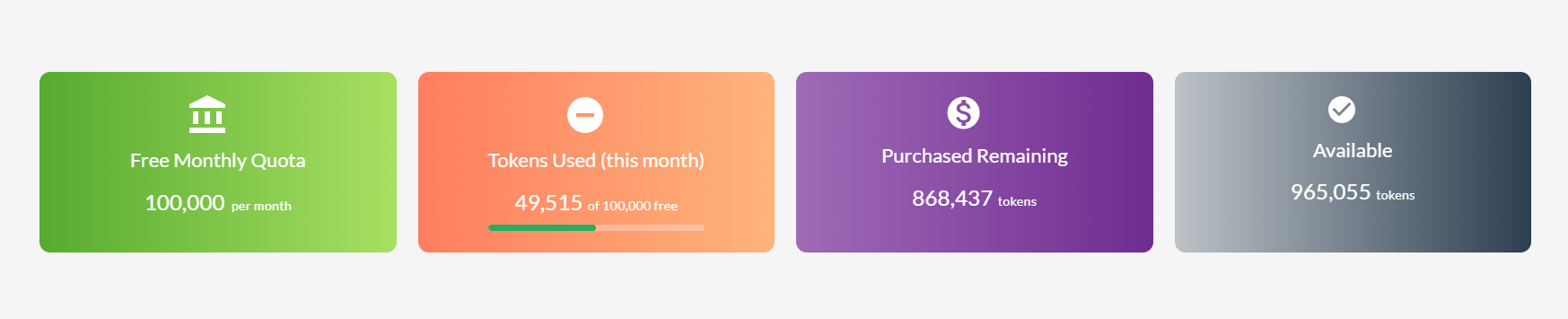
Four cards at the top of the dashboard show your organisation's current token position at a glance:
| Card | What it shows |
|---|---|
| Free Monthly Quota | The number of tokens your organisation receives free each month. Resets at the start of every billing month. |
| Tokens Used (this month) | Tokens consumed so far in the current month. The bar turns yellow above 70% and red at 90% or above. |
| Purchased Remaining | Tokens from paid top-ups still available. These don't expire until 12 months from the date of purchase. |
| Available | Free remaining + purchased remaining — your total usable balance right now. |
Usage charts
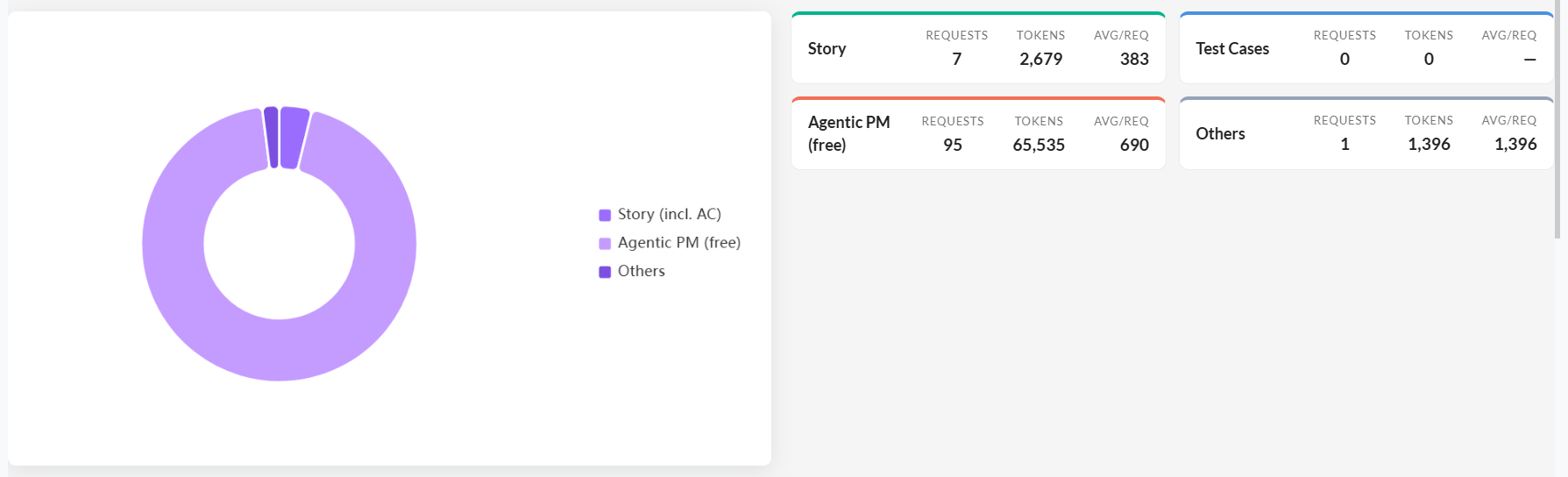
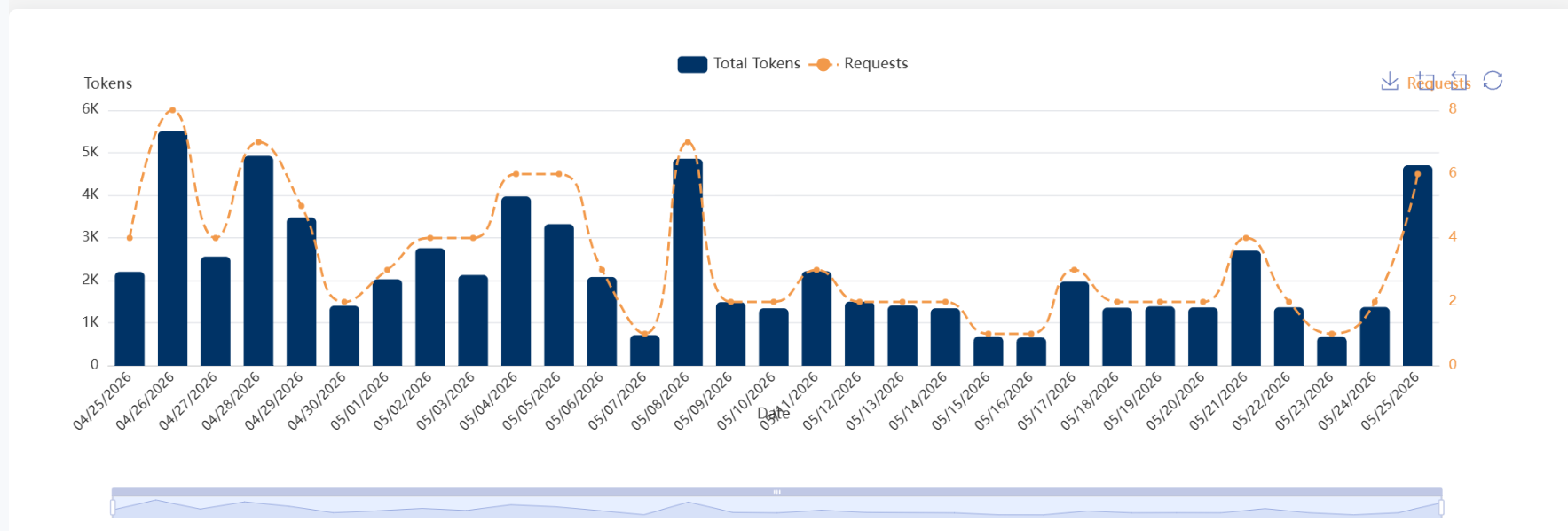
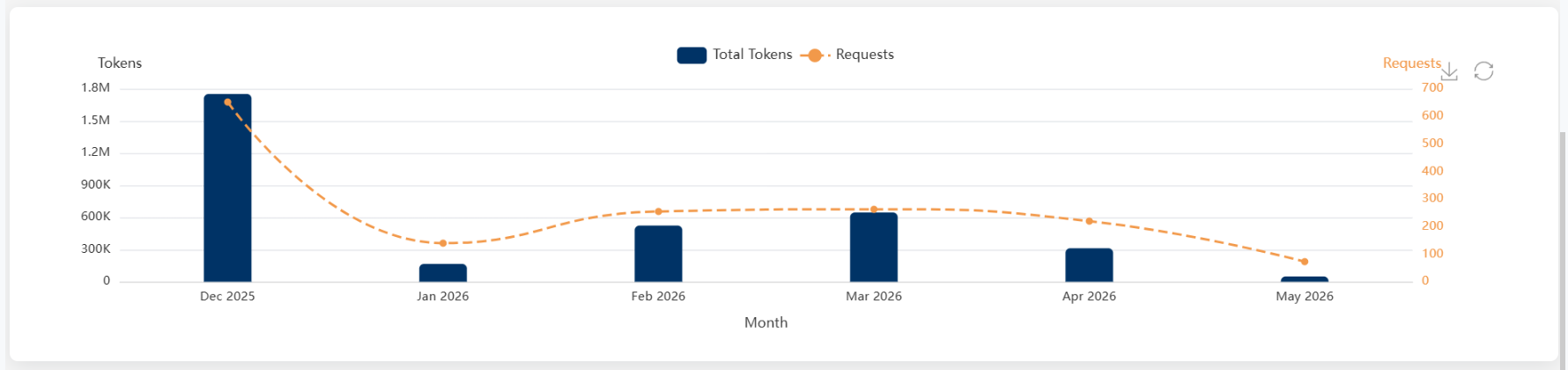
Three charts below the summary cards break down consumption in detail:
- AI Token Distribution by Feature — a donut or pie chart showing what share of tokens each AI feature consumed: StoryCraft AI (Text / Image / Document / Video), Story, Test Cases, Ask Monty, Agentic PM, and Others.
- Last N Days AI Tokens Usage — a bar, line, or area chart of total tokens and request count over the selected date range (7, 14, 30, or 90 days).
- Last 6 Months AI Usage — an area chart of historical monthly consumption over the past six months. Useful for spotting growth trends and planning future token purchases.
Customising the dashboard
Click Customize on the AI Usage Dashboard toolbar to open Display Preferences. Options:
- Chart Type — Bar, Line, or Area for the Last N Days chart
- Date Range — 7 days, 14 days, 30 days, or 90 days
- Distribution Chart Style — Donut or Pie
- Token Series — toggle Prompt Tokens and Completion Tokens on or off to focus on what matters to you
- Summary Cards — individually toggle any of the four summary cards on or off
Click Save Preferences to persist your layout choices.
Purchasing additional tokens
Tokens are purchased from Enterprise Settings → Billing → Add Ons → Add AI Tokens. Only Financial Admins can purchase tokens.
Purchased tokens are organisation-wide — any user running AI features draws from the same pool. They are valid for 12 monthsfrom the date of purchase, regardless of how many are used.
Token conversion reference
Tokens are not the same as words. This table shows approximate conversions for English text (code and non-English languages tokenise differently):
| Tokens | Approximate equivalent |
|---|---|
| 1 token | ≈ 4 characters |
| 1 token | ≈ 0.75 words |
| 100 tokens | ≈ 75 words |
| ~2,048 tokens | ≈ 1,500 words |
| 500 words | ≈ 670 tokens |
| 1,000 words | ≈ 1,330 tokens |
| 2,000 words | ≈ 2,670 tokens |
These are English-language approximations. Token counts vary by language and text type — code tends to tokenise differently to prose.
Troubleshooting
I can't see the AI Usage Dashboard
The AI Token Consumption page is at /ai-token-usage and is accessible from Enterprise Settings. If you can't find it, check that your user account has Enterprise Admin or Financial Admin access. Regular project members do not have access to organisation-wide token usage data.
The "Tokens Used" bar is red — what happens when we run out?
When the free monthly quota is exhausted, Silverile draws from your purchased token balance. If both are depleted, AI features stop generating output until the quota resets next month or additional tokens are purchased. No partial generation occurs — the request is declined.
Why do purchased tokens not match the "Available" total?
The Available card shows free remaining plus purchased remaining combined. If your free quota for the month is partially used, Available = (free quota − used this month) + purchased remaining. Check the individual cards to reconcile.
I bought tokens but the balance hasn't updated
After a successful purchase, a confirmation shows: "Your tokens have been added to your organization's balance and are valid for 1 year from the date of purchase." If the dashboard hasn't updated, refresh the page. If it still shows the old balance after a few minutes, contact Silverile support with the purchase confirmation.
Token counts vary between sessions for similar inputs
Token consumption depends on the exact text, image size, or document length processed — not just the approximate word count. Code and non-English text tokenise differently to English prose. The conversion table on the purchase dialog gives approximations, not exact counts.