Timeline View
ViewsOverview
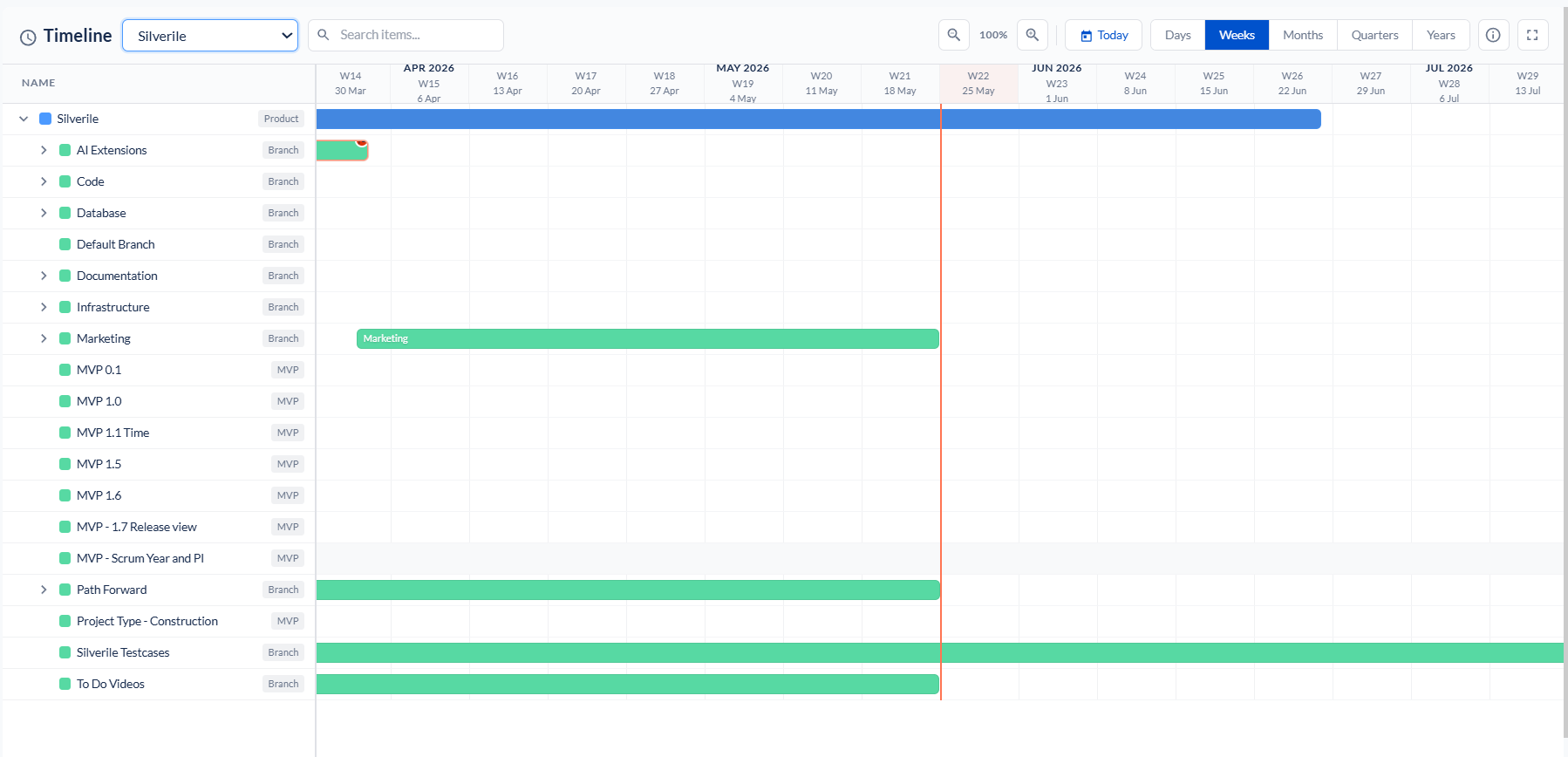
The Timeline View gives a visual picture of all your projects plotted on a horizontal calendar. Each project expands to show its branches and MVPs as nested bars. You can click any entity to see its KPIs in a side panel, drag bars to adjust dates, and right-click to access edit, create, and delete actions — all without leaving the timeline.
Getting there
What appears on the timeline
Each row represents one entity. The horizontal bar spans its start and end dates. A status indicator at the bottom of each bar shows the entity's current status at a glance.
| Entity | How it appears |
|---|---|
| Project | Spans the project's overall start and end dates. Colour reflects the project status. |
| Branch | Nested under the parent project. Spans the branch start and end dates. Branches are the direct parents of stories. |
| MVP / Milestone | Nested under the project. Spans the milestone start and due date. Colour reflects milestone status. |
Entity KPI panel
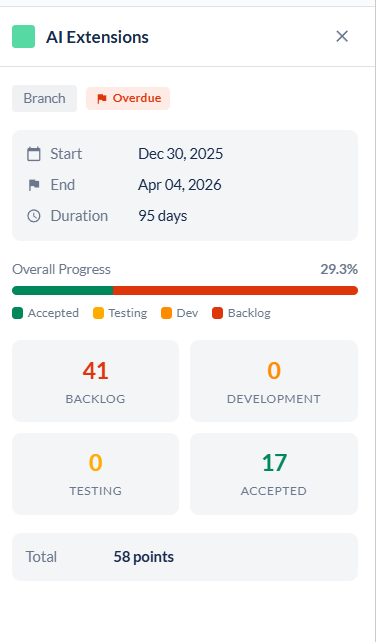
Right-clicking an entity bar opens a panel that displays the entity's KPIs and status data. The panel appears as an expandable tab on the right side of the screen — it shows information such as story counts, point totals, status breakdown, and key dates for that entity, without navigating away from the timeline.
The same right-click also surfaces the action menu (Edit, Create Story, Delete) alongside the KPI data so you can act on the entity immediately.
Adjusting dates by dragging
You can extend or shorten a project or branch bar directly on the timeline without opening an edit form:
Right-click context menu
Right-clicking an entity bar opens a context menu with actions relevant to that entity type.
| Action | Applies to | What it does |
|---|---|---|
| Edit Project / Edit Branch | Project or Branch row | Opens the edit form for the project or branch directly from the timeline. |
| Create Story | Branch row only | Opens the create story wizard with the branch pre-filled. |
| Delete | Project or Branch row | Deletes the project or branch after confirmation. Permanent — cannot be undone. |
Troubleshooting
The timeline is empty
The timeline requires at least one project with start and end dates. If projects exist but don't appear, check that their dates are configured correctly.
A branch or MVP is not appearing under its project
Branches and MVPs must have start and end dates set to appear as bars. Open the entity and add the missing dates.
I can't drag the start or end point of a bar
Dragging to adjust dates requires contributor access or above. Read-only members can view but not edit. Also check that the entity is not in a locked or closed state.
The side panel is not opening when I click an entity
Click directly on the entity bar, not on empty space in the row. If the panel still doesn't open, try refreshing the page.
The right-click menu is not showing
Right-click directly on the entity bar. The context menu appears on project and branch rows — it does not appear on MVP rows or empty timeline space.
I deleted a branch by mistake
Deletion is permanent and cannot be undone from the timeline. Contact your project manager — depending on your setup, a database restore may be the only recovery option.
The project switcher at the top is not showing all my projects
The list only shows projects you have access to. If a project is missing, ask the project manager to add you as a member.